
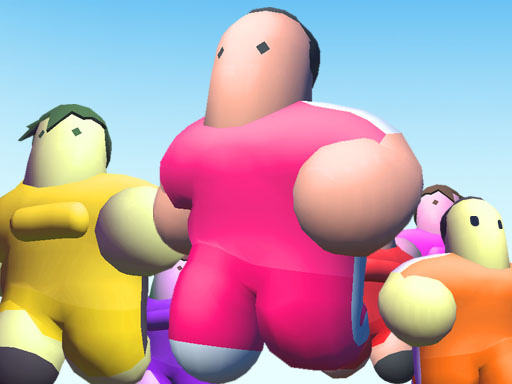
Bean Race Challenge Online
Opens in a play window — no download required.
Reviews
Bean Race Challenge Online stands out for its cheerful visuals and easy-to-learn gameplay. The elimination-style rounds keep each race exciting, while the variety of obstacles adds challenge without frustration. It's a great choice for casual gamers seeking lighthearted competition. The free, no-download access makes it instantly playable anywhere.
Description
Game Introduction
Bean Race Challenge Online is a cheerful multiplayer online game where players control a bean-shaped character through colorful obstacle courses. The core objective is to survive each round by avoiding obstacles and outlasting opponents. Only the last few beans advance to the next race, creating an exciting elimination-style competition. The game features bright, playful visuals and a lighthearted tone suitable for all ages. It offers a quick and entertaining break for anyone looking for friendly competition.
How to Play
Players guide their bean character using keyboard or mouse controls to move left, right, forward, and backward. Each race begins with a large group of beans. The goal is to reach the finish line or avoid being knocked off the course by obstacles. Obstacles may include moving walls, rotating beams, and slippery surfaces. If a bean falls off or is eliminated, that player is out for the round. The last beans standing move on to the next race. Quick reflexes and smart positioning are key to staying in the game.
Game Features
Features include colorful and varied courses, elimination-style rounds that keep each race exciting, simple controls that are easy to learn, and family-friendly content with no violence or inappropriate themes. The game is free to play online without downloads, designed for short, fun sessions that can be played repeatedly without losing appeal. It is available on platforms like gamesnout.com, friv.ee, and girlgames.ee.
Tips for Success
Practice regularly to improve your reflexes and learn the layout of each course. Pay attention to moving obstacles and plan your path carefully. Stay in the middle of the group to avoid being pushed off edges. Use quick, small movements to dodge hazards. Watch other players to see which strategies work best. Most importantly, stay calm and have fun—the game is meant to be a lighthearted experience.







Comments
Sign in to leave a note
You must be logged in before posting a review or rating.
No account? Create one
No comments yet. Be the first to comment!