
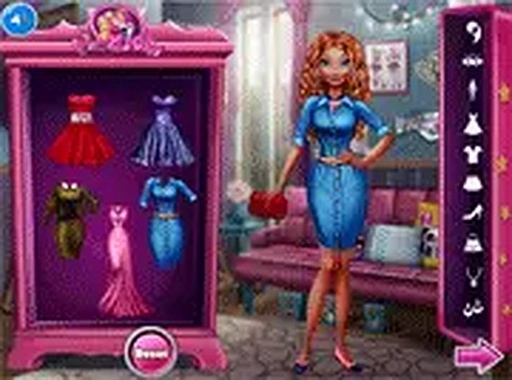
Outfit Planner for Everyday Occasions
Opens in a play window — no download required.
Reviews
Outfit Planner for Everyday Occasions succeeds by keeping things simple. The occasion-based prompts give direction without dictating a single correct answer, which encourages genuine experimentation. The wardrobe is well-organized and offers enough variety to keep each session interesting. The absence of timers and scores makes it a great choice for winding down. Cross-device support means you can play anywhere, and the family-safe content ensures it is suitable for all ages. A solid pick for anyone who enjoys casual creative play.
Description
Occasion-Based Styling
Each round presents a different event, from a relaxed weekend gathering to a professional work setting. The game gives you a short description of the occasion, and your job is to pick clothing that matches the mood. There are no right or wrong choices—just opportunities to try new combinations. This structure encourages players to think about context and appropriateness in fashion, while keeping the experience light and open-ended.
Closet Exploration
The wardrobe is divided into clear categories: tops, bottoms, shoes, and accessories. You can click through each section to preview items on the character. The interface updates instantly, so you can see how a striped top pairs with solid pants or how different shoe colors change the overall feel. Hairstyles are also available to complete the silhouette. The system is designed for quick experimentation without clutter.
Relaxed Pace
There are no timers, scores, or penalties. You can spend as much time as you like adjusting each element. This makes the game suitable for young children who are still learning mouse control, as well as adults who want a low-stress creative break. The lack of pressure also means you can revisit and revise outfits freely, trying out ideas you might not consider under time constraints.
Cross-Device Accessibility
The game runs entirely in a web browser, so there is no need to download or install anything. It works on desktop computers, tablets, and smartphones. The controls are simple taps or clicks, and the layout adjusts to different screen sizes. This portability means you can play during a short commute or while waiting in line, picking up exactly where you left off.
Family-Friendly Content
All clothing items, hairstyles, and event themes are designed to be appropriate for players of all ages. There is no violence, suggestive material, or real-money transactions. The focus stays on creativity and personal expression. The game also avoids ads that interrupt play, so the experience remains smooth and child-safe. New events and clothing pieces are added periodically to keep the selection fresh.








Comments
Sign in to leave a note
You must be logged in before posting a review or rating.
No account? Create one
No comments yet. Be the first to comment!