
Pastry Shop Interior Designer
Opens in a play window — no download required.
Reviews
Pastry Shop Interior Designer succeeds by removing everything that makes design games stressful. There are no customer complaints, no budget limits, and no time constraints. The three distinct zones give enough variety to keep the activity fresh, while the simple drag-and-drop controls make it accessible to all ages. The screenshot sharing feature adds a light social layer without forcing interaction. It is a focused, relaxing experience for anyone who enjoys arranging virtual spaces.
Description
Three Distinct Spaces to Style
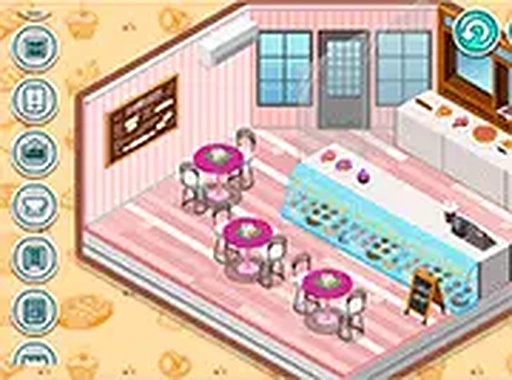
Players get to work on three separate zones within the shop. The first is a private area meant for the baker, where personal touches like rugs and shelves can be placed. The second zone is the front counter, where pastries are displayed. The third is the seating area for visitors. Each space has its own character, so you can treat them as individual mini-projects or create a unified theme across all three.
Furniture Selection and Placement
The game offers a broad catalog of furniture and decorative items. You can pick tables, chairs, lighting fixtures, wall art, and small accessories. Items are dragged from a menu and dropped into the desired spot. There is no grid snapping or rotation limit, so you have full control over positioning. If something does not look right, simply move it elsewhere or swap it for another piece.
No Timers, No Stress
Unlike many design games that rush you with countdowns or customer satisfaction meters, this one removes all time pressure. You can spend as long as you like on a single arrangement. The only goal is to create a layout that pleases you. This makes the experience suitable for younger players or anyone looking for a calming activity.
Sharing Your Completed Layout
After you finish decorating, the game includes a built-in screenshot tool. One click captures the current view of any zone. You can then save the image to your device or upload it to your profile within the game. Other players can browse these shared images, giving you a chance to inspire or get inspired by the community.
Browser-Based Accessibility
No installation is required. The game runs directly in a web browser on both desktop and tablet devices. Controls are optimized for mouse clicks and touch taps. This means you can start designing immediately without waiting for downloads or updates. The interface remains clean and uncluttered, with all options visible on one screen.








Comments
Sign in to leave a note
You must be logged in before posting a review or rating.
No account? Create one
No comments yet. Be the first to comment!